SIM001 › Beyond the cockpit › The flight computer
Reading the flight display
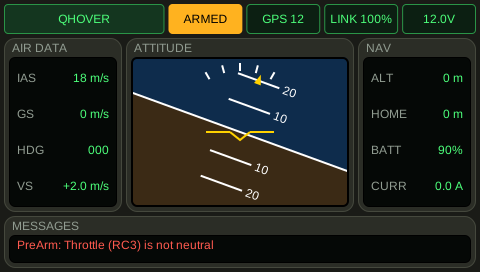
The plane is armed in a left bank, flying at 18 m/s and climbing. A PreArm check has failed earlier. The screen shows all of it at once: the horizon is banked, the mode is big on the top left, and the message is on the bottom.
Wait 5 seconds.
QHOVER: the first lamp on the screen of the TX15 shows this flight mode. The second lamp on the screen of the TX15 shows ARMED, and it is amber. The TX15 screen bank is at most -19 degrees. The TX15 screen airspeed is at least 17.5 m/s. PreArm: Throttle (RC3) is not neutral: the newest message line at the bottom of the screen of the TX15 says this, in the colour of its severity.
Learn more
How this is tested passed
This tutorial is also an acceptance test. Its report has every step, check and screenshot from the last run.
The user story: As a pilot with a TX15, I want the screen of the TX15 to show the flight as a flight display, so that I see the mode, the attitude, the speeds, the battery and what ArduPilot says.
Given the TX15 screen mode is QHOVER
  And the TX15 screen arming is armed
  And the TX15 screen bank is -20 degrees
  And the TX15 screen airspeed is 18 m/s
  And the TX15 screen climb is 2 m/s
  And the TX15 screen satellites is 12
  And the TX15 screen message is PreArm: Throttle (RC3) is not neutral
When 5 seconds pass
Then the TX15 screen mode is QHOVER
  And the TX15 screen arming is armed
  And the TX15 screen bank is at most -19 degrees
  And the TX15 screen airspeed is at least 17.5 m/s
  And the TX15 screen message is PreArm: Throttle (RC3) is not neutral