SIM001 › Beyond the cockpit › The flight computer
Flying with a TX15 on the serial line
Fly and watch the screen
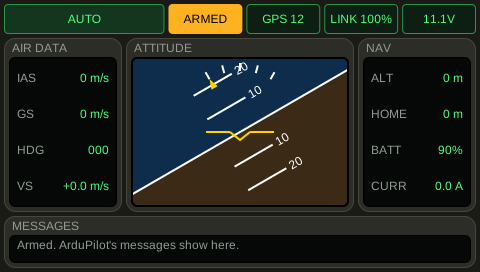
You connect the TX15 to the flight computer with a serial line. The sticks move the channels of the autopilot, and the screen of the TX15 shows what the plane does. You arm the plane, ArduPilot changes its mode, and the TX15 shows the new mode.
Wait 5 seconds.
The arm channel is at least 1900 us. AUTO: the first lamp on the screen of the TX15 shows this flight mode. The second lamp on the screen of the TX15 shows ARMED, and it is amber. The TX15 screen battery is at least 11 V. The TX15 screen battery is at most 11.2 V. The TX15 screen bank is at least 29 degrees. The TX15 screen bank is at most 31 degrees. The ground station hears the HEARTBEAT of the plane. The ground station map distance is at least 399 m. The ground station map distance is at most 401 m.
Learn more
How this is tested passed
This tutorial is also an acceptance test. Its report has every step, check and screenshot from the last run.
The user story: As a pilot with a TX15, I want the sticks to reach the plane through the flight computer, so that I fly the way I fly the real plane.
Given the TX15 screen mode is AUTO
  And the TX15 screen arming is armed
  And the TX15 screen battery is 11.1 V
  And the TX15 screen bank is 30 degrees
  And the ground station telemetry is flowing
  And the ground station map distance is 400 m
  And the TX15 arm switch is on
When 5 seconds pass
Then the arm channel is at least 1900 us
  And the TX15 screen mode is AUTO
  And the TX15 screen arming is armed
  And the TX15 screen battery is at least 11 V
  And the TX15 screen battery is at most 11.2 V
  And the TX15 screen bank is at least 29 degrees
  And the TX15 screen bank is at most 31 degrees
  And the ground station telemetry is flowing
  And the ground station map distance is at least 399 m
  And the ground station map distance is at most 401 m