SIM001 › Beyond the cockpit › Flying by plan
Watching a game of tag by plan
The runner starts three ArduPlane SITL planes and plays a game of tag with them. The scripted ground control agent flies every plane by plan in AGENT mode. After the game, you send a plan of your own to the first plane, and you watch its status.
Scroll up to the report just above
console ready.The report of the runner says
RESULT in_agent=3. All three planes played in AGENT mode. The report of the runner saysRESULT refused=0. The planes accepted every plan, every game command and every mode change. For each new plane that is it, the runner printed a line. The line says who tagged whom, or who left the arena.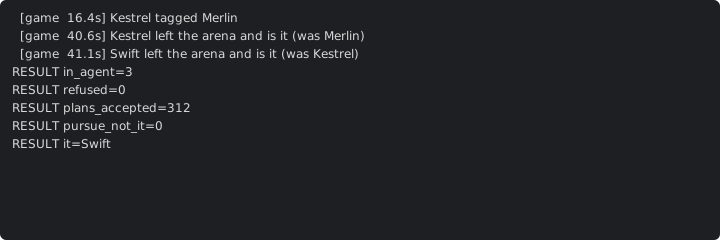
Type
plan goto 80 10 40 0 600in the console. This plan tells the plane to fly to the point 80 m north and 10 m east of home, at 40 m.The plane replies with COMMAND_ACK, result 0 (ACCEPTED). The console shows
ackwithresult=0.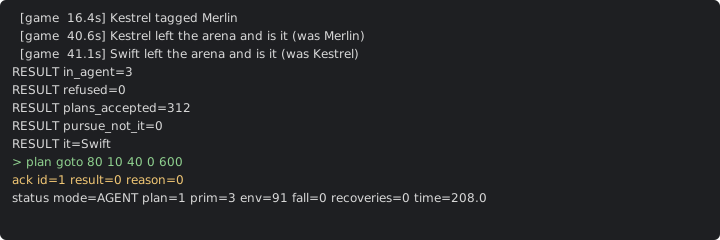
Type
watch 10in the console. The console counts the AG_PLAN messages in the next 10 s of simulated time.The console shows
reports 10, or 9 or 11: the status comes once a second.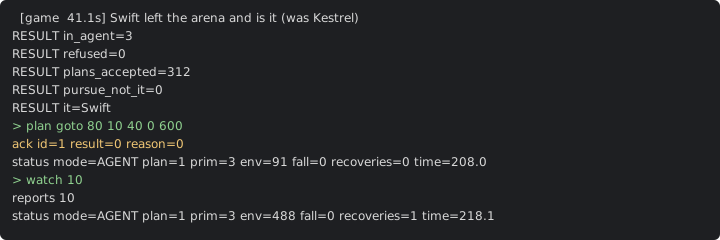
Learn more
How this is tested passed
This tutorial is also an acceptance test. Its report has every step, check and screenshot from the last run.
The user story: As a developer of a ground control agent, I want to watch the scripted agent play tag with three real ArduPilot planes, so that I have a baseline for my own agent.
When the planes play a game of tag
Then the planes in AGENT mode are 3
  And the refused commands are 0
  And the reports of the hand-overs are complete
When the ground sends a go-to plan
Then the reply to the plan is accepted
When the operator watches the status for 10 seconds
Then the status reports in 10 seconds are between 9 and 11