SIM001 › Beyond the cockpit › The flight computer
Telemetry on the TX15
The flight computer sends the state of the plane back down the serial line. The TX15 shows it on its screen, as it does for any plane with an ExpressLRS receiver.
The TX15 shows the flight mode
If the TX15 screen mode is RTL, wait 5 seconds. RTL: the first lamp on the screen of the TX15 shows this flight mode.
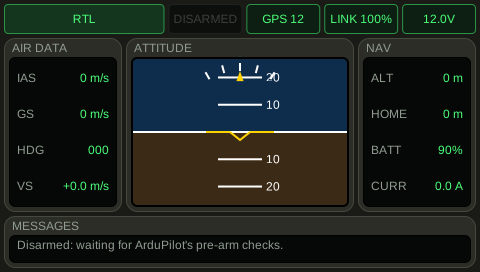
See it in Command through the line.
How this is tested verified
Given the TX15 screen mode is RTL
When 5 seconds pass
Then the TX15 screen mode is RTL
The TX15 shows when the plane is armed
If the TX15 screen arming is armed, wait 5 seconds. The second lamp on the screen of the TX15 shows ARMED, and it is amber.
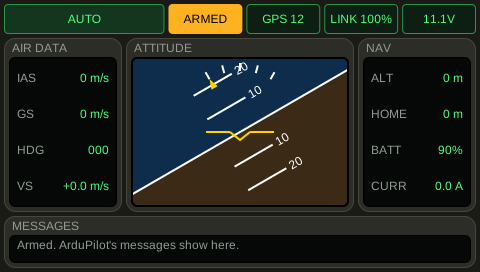
See it in Fly and watch the screen, Reading the flight display.
How this is tested verified
Given the TX15 screen arming is armed
When 5 seconds pass
Then the TX15 screen arming is armed
The TX15 shows the battery
If the TX15 screen battery is 11.1 V, wait 5 seconds. The TX15 screen battery is at least 11 V. The TX15 screen battery is at most 11.2 V.
See it in Fly and watch the screen.
How this is tested verified
Given the TX15 screen battery is 11.1 V
When 5 seconds pass
Then the TX15 screen battery is at least 11 V
  And the TX15 screen battery is at most 11.2 V
The TX15 shows the bank
If the TX15 screen bank is 30 degrees, wait 5 seconds. The TX15 screen bank is at least 29 degrees. The TX15 screen bank is at most 31 degrees.
See it in Fly and watch the screen.
How this is tested verified
Given the TX15 screen bank is 30 degrees
When 5 seconds pass
Then the TX15 screen bank is at least 29 degrees
  And the TX15 screen bank is at most 31 degrees